Description
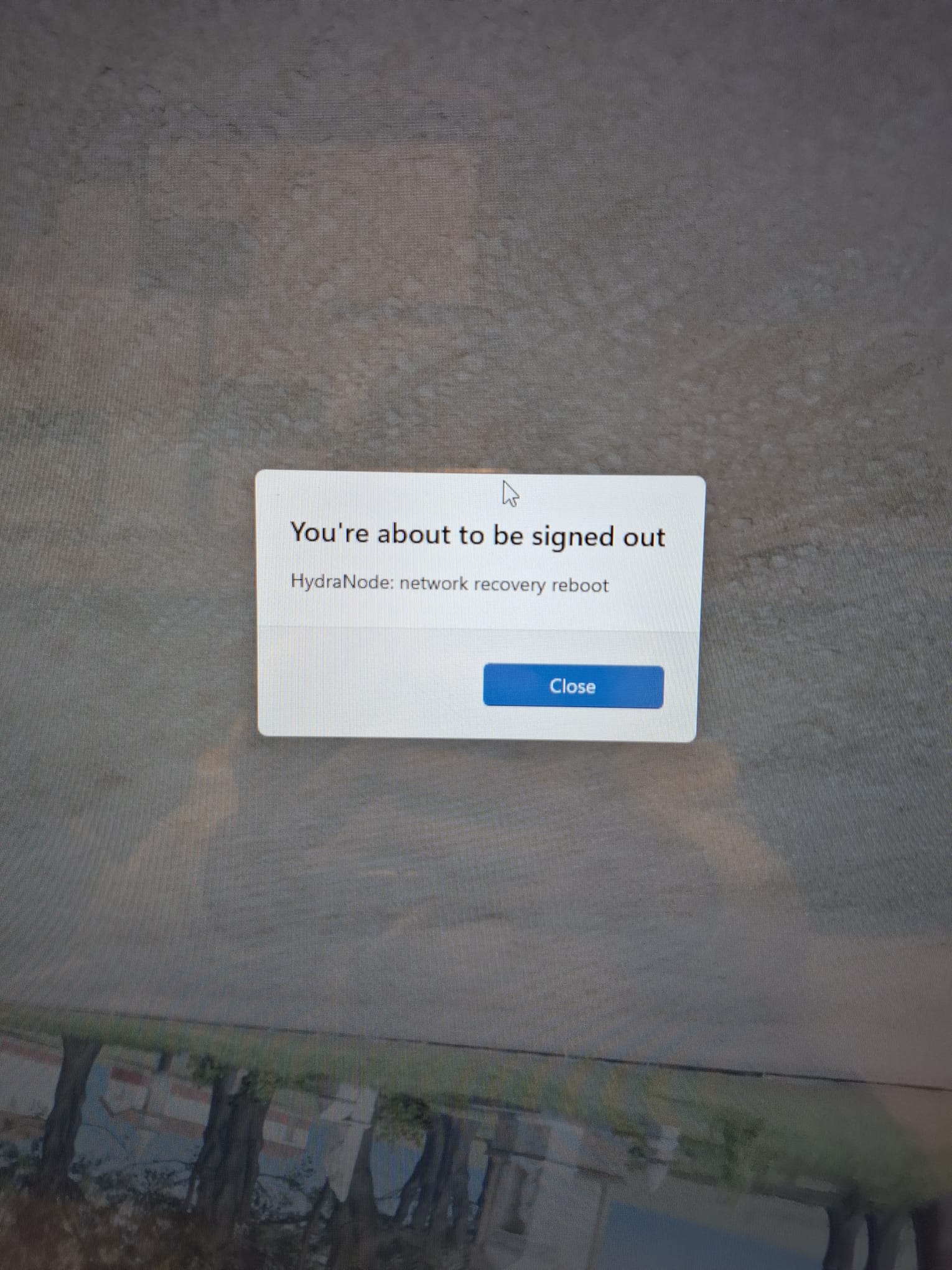
From gallo romeins museum: Dag Cederik, we hebben de nieuwe VR getest en bijna op het einde verscheen er "reboot". Sindsdien is de experience net vh netwerk verdwenen
Attachments (1)
Comments (5)
ROOT CAUSE CONFIRMED by the screenshot - this is OUR software, not Windows Update (earlier hypothesis wrong). HydraNode (our node agent) has a network-recovery escalation: after 12 consecutive failed heartbeats it disables/re-enables the network adapter, after 20 it REBOOTS the machine, and it repeats every ~5+ minutes for as long as it cannot reach the network. The machine is stuck in that reboot loop. The "reboot" at the end of the VR session was the first firing; the adapter disable/enable step just before it is likely what killed the headset stream near the end. A DNS/internet outage at the museum is enough to trigger this even when the local LAN is fine - and a netsh adapter disable SURVIVES reboots, so if the re-enable failed once, the Ethernet stays dead forever.
VOOR HET MUSEUM (Nederlands):
- Zodra het venster "You are about to be signed out" verschijnt heb je 60 seconden: druk Windows-toets + R, typ cmd, Enter, en typ dan: shutdown /a (dit annuleert de herstart).
- Druk daarna Windows-toets + R, typ ncpa.cpl, Enter. Staat "Ethernet" op Uitgeschakeld/grijs? Rechtermuisklik > Inschakelen. Controleer ook de netwerkkabel en of de router/switch van het museum werkt (lampjes).
- Als het netwerk niet meteen te herstellen is: open Taakplanner (taskschd.msc), zoek de taak "HydraNode", rechtermuisklik > Uitschakelen. Daarna herstart de PC NIET meer vanzelf en werkt de VR-ervaring gewoon offline (spel + Business Streaming + hotspot hebben geen internet nodig). Start daarna eerst Business Streaming, dan RomeinsMuseum.exe.
- Laat ons weten wat je bij stap 2 zag - kabel/router of uitgeschakelde adapter.
Follow-up on our side: hydranode must never hard-reboot a venue body (DNS-only failure should not count as local-broken; adapter re-enable must be verified; reboot escalation should be opt-in per role). Separate hydranode issue to follow. Once the box is stable and networked again: re-enable the HydraNode task, verify HydraBody still disabled, hotspot, CL9 tree.
RESOLVED remotely 2026-09-22 07:38 UTC. Fluffy came back online on its own the moment the network recovered (07:37 UTC) and immediately auto-updated to the fixed hydranode v1.10.42. Verified on the box: reboot escalation now DISABLED (startup log: "network recovery: reboot escalation disabled, ceiling is adapter restart"), no shutdown pending, DNS resolving normally, CL9 experience tree intact (378 files), HydraBody task still disabled, hotspot on, PeerlessTimeoutEnabled still 0.
Root cause was 100% ours (hydranode #758): every reboot was driven by a DNS lookup failure for hydracluster.experiencenet.com. The old agent treated a DNS-only failure as "local network broken" and rebooted every ~11 minutes. Since the museum internet/DNS tends to drop around the time the experience is started, staff saw it as "reboot when we start the experience." The new agent never reboots for this (reboots are now opt-in and off for venue bodies, and a DNS-only failure triggers no recovery action).
VOOR HET MUSEUM: jullie mogen de ervaring gewoon opnieuw starten (eerst Business Streaming, dan RomeinsMuseum). De PC zal NIET meer vanzelf herstarten. Als het beeld toch wegvalt, is dat een los netwerkprobleem en geen herstart meer; laat het ons weten.
Separately: the museum still has an intermittent upstream internet/DNS drop worth chasing with their IT, but it can no longer take the machine down.
CLOSING SUMMARY.
Timeline:
- 2026-09-21 08:23 UTC: fluffy (gallo-romeins body) dropped off the network mid VR test; a "reboot" dialog appeared and the experience vanished. Reported by museum staff, with a photo of the dialog: "HydraNode: network recovery reboot".
- 2026-09-21 to 09-22: box reboot-looped every ~11 min whenever upstream DNS/internet was down.
- 2026-09-22 07:37 UTC: network recovered; fluffy came back and auto-updated to the fixed agent; loop ended.
Root cause (ours, not Windows Update): hydranode network-recovery escalation. The old agent treated a DNS-only resolution failure (lookup of hydracluster.experiencenet.com) as "local network broken" and escalated to a full machine reboot after 20 failed heartbeats, repeating indefinitely. The museum internet/DNS tends to drop near experience-start time, which is why staff experienced it as "reboot when we start the experience".
Fix: hydranode v1.10.42 (issue #758). Reboots are now opt-in and OFF by default for venue bodies; a DNS-only failure triggers no recovery action; adapter restarts can no longer leave the NIC permanently disabled; adapter selection is safe on hotspot/WireGuard boxes.
Verified on fluffy 2026-09-22: running v1.10.42, startup log "reboot escalation disabled, ceiling is adapter restart", no pending shutdown, DNS resolving, HydraBody task disabled, hotspot on, PeerlessTimeoutEnabled=0, CL9 experience tree intact (378 files). The other live venue bodies (rupelmonde, cloud-seven) are also on v1.10.42.
Residual (separate, non-destructive): the museum upstream internet/DNS is intermittently dropping. Worth chasing with museum IT, but it can no longer take the machine down. Fleet-wide agent rollout tracked in #758.
VOOR HET MUSEUM: opgelost. Jullie mogen de ervaring gewoon starten (eerst Business Streaming, dan RomeinsMuseum); de PC herstart niet meer vanzelf. Valt het beeld ooit weg, dan is dat een netwerkprobleem en geen herstart; laat het ons weten.
Follow-up 2026-09-22 ~10:00 UTC: staff (Stephanie) reported the headset was connected to experiencenet but the program would not start, staying on the PICO Android home screen. Cause: after this mornings reboot the PC apps were in the wrong state (game running, but the Business Streaming DESKTOP app was not running, so the games OpenXR runtime was refused). Fixed remotely: started Business Streaming, then restarted RomeinsMuseum; the OpenXR runtime now attaches cleanly (AddDriverClient), and ps_server sees the headset on the hotspot (hmd_4B3J3IFi). PC side is fully stream-ready.
Laatste stap in de BRIL (autoConnect staat uit, dus dit moet handmatig):
- Zet in de bril de PICO Business Streaming-app aan (vanaf het Android-startscherm: open de app-lijst en tik op Business Streaming / Pico Connect). De ervaring start niet vanzelf, je moet de app openen.
- In die app verschijnt de PC hydra-s-0000 - tik erop / tik Verbinden.
- Daarna start de museumervaring automatisch in de bril.
Als hydra-s-0000 niet verschijnt: sluit de app in de bril en open ze opnieuw. Lukt het dan nog niet, laat het weten.
Investigated 2026-09-21 ~09:00 UTC. The body (fluffy-dumpling-87 / hydra-s-0000) is OFFLINE: cluster status offline, no exec channel, unreachable on the mesh, last WireGuard handshake with the hub at 08:23:36 UTC (10:23 local) - minutes before this report. So the PC itself went down right after the "reboot" message; the headset side is fine, there is simply no PC advertising on the hotspot.
The "reboot" message at the end of the session was almost certainly Windows Update forcing a restart (the machine runs Win11 26200 and had been up for weeks), not the new CL9 build - the build ran fine since install on the 18th and staff got through nearly the whole experience before the message.
Nothing can be done remotely while it is down (per runbook: never reboot remotely, autologin needs physical access). Needed ON SITE at the museum:
Remote follow-up once it is back online: verify HydraBody task still disabled, hotspot on, CL9 tree intact, PeerlessTimeoutEnabled still 0, and check Windows Update log to confirm the reboot cause. A handshake watch is armed.