Description
Mocht je nog tijd hebben nu, zou je eens naar de Mercator kunnen kijken, hij start altijd goed maar na enkele zinnen bevriest het scherm en krijg ik deze melding
Machine: wobbly
Investigation 2026-08-02
Node: wobbly-llama-92 / node-5f8b7b59 / hostname airborne-two, online, hydrabody v2.0.65.
Build: C:/experiences/mercator-talks/MercatorV0.9/Mercator56/Binaries/Win64/ (UE 5.6.1, Shipping).
Launch args: Mercator56 -Language=NL -PushToTalkEnabled=False -SkipStartMenu=True.
What the dialog is
UE CrashReportClient. CrashType = GPUCrash, ErrorMessage = "GPU Crash dump Triggered", RHI = D3D12,
Aftermath dump present (D3D12.*.nv-gpudmp). This is a GPU device removal / engine timeout, not a
Blueprint or content exception.
Crash history (C:\Users\airborne-two-user\AppData\Local\Mercator56\Saved\Crashes)
03-06 08:43  Hang (GameThread waited 120s on RenderThread) + GPUCrash   drv 576.88
04-22 18:08  GPUCrash  after   59s   drv 576.88
04-24 17:41  GPUCrash  after  245s   drv 596.21
05-02 15:56  GPUCrash  after   53s   drv 596.21
05-02 15:59  EXCEPTION_ACCESS_VIOLATION after 28s
05-03 17:27  GPUCrash  after  124s   drv 596.21
07-25 14:14  GPUCrash  after   24s
07-25 14:15  GPUCrash  after   13s
07-25 14:19  GPUCrash  after  163s
08-02 13:47  GPUCrash  after   11s
08-02 13:50  GPUCrash  after   37s
08-02 13:56  GPUCrash  after   24s   <-- the one in the photo (11:56 UTC, ~5 min before this report)
"Starts fine, freezes after a few sentences" matches: the crash lands 11 to 37 seconds after launch.
It is not a Mercator bug
The same machine also has GPU crash dumps for the Rupelmonde experience (04-24, 05-02, 05-10) and
6 Sunshine.exe APPCRASH reports. Two unrelated UE apps failing the same way points at the machine.
The machine itself is unstable
System event log and WER on airborne-two:
- 39 x LiveKernelEvent 0x141 (VIDEO_ENGINE_TIMEOUT_DETECTED), plus a WATCHDOG live kernel dump at 08-02 13:50.
nvlddmkmEvent ID 153 ("Error occurred on GPUID: 100", \Device\Video3) at 13:47:35, 13:50:02, 13:50:03
and 13:56:44, exactly matching each UE GPU crash.- Kernel bugchecks (BSOD): 07-25 0x00000001, 08-01 0x00000139, 08-02 0x0000000A, 08-02 0x00000139.
WER also holds 0x9F, 0xD1, 0x13A buckets. Minidumps in C:\Windows\Minidump (5 files). - Boot history shows 9 restarts on 08-01 and 08-02 alone.
Varied, inconsistent bugcheck codes plus repeated GPU engine timeouts is the signature of failing
hardware or a corrupted display driver stack, not of one bad application.
Environment notes
- GPU: RTX 5070 Ti, driver 596.21 (32.0.15.9621, dated 2026-04-13), installed 2026-04-22. Idle temp 46 C,
power limit 300 W, nothing anomalous at idle. - OS: Windows 25H2 build 26200.8875. KB5120102 (07-17) and KB5101650 / KB5100998 (07-19) went in shortly
before the crash rate jumped on 07-25. Correlation only, not proven. - Two Virtual Display Driver adapter instances are present (ROOT\DISPLAY\0000 and ROOT\DISPLAY\0001),
giving 3 active monitors (1 x SAM0B96 physical + 2 x MTT1337 virtual). This is the duplicate VDD condition
from #428 and should be cleaned up regardless.
Suggested next steps (in order, all need physical access to wobbly)
- Remove the duplicate VDD adapter instance so only one virtual display remains.
- Clean-reinstall the NVIDIA driver (DDU, then a known good branch), and consider rolling back to a driver
older than 596.21. - If GPU timeouts persist, stress test (memtest for system RAM, an OCCT/FurMark VRAM pass) and treat the
5070 Ti as suspect for RMA. - Only after the machine survives a stress pass should Mercator V0.9 be retested.
Not fixable remotely. Mercator itself needs no code change based on this evidence.
Update 2026-08-02 16:40 local, after the two new comments
Analysed the added photo (boot recovery screen) and both comments. This changes the reading of the
earlier section, so treat the assessment below as superseding it.
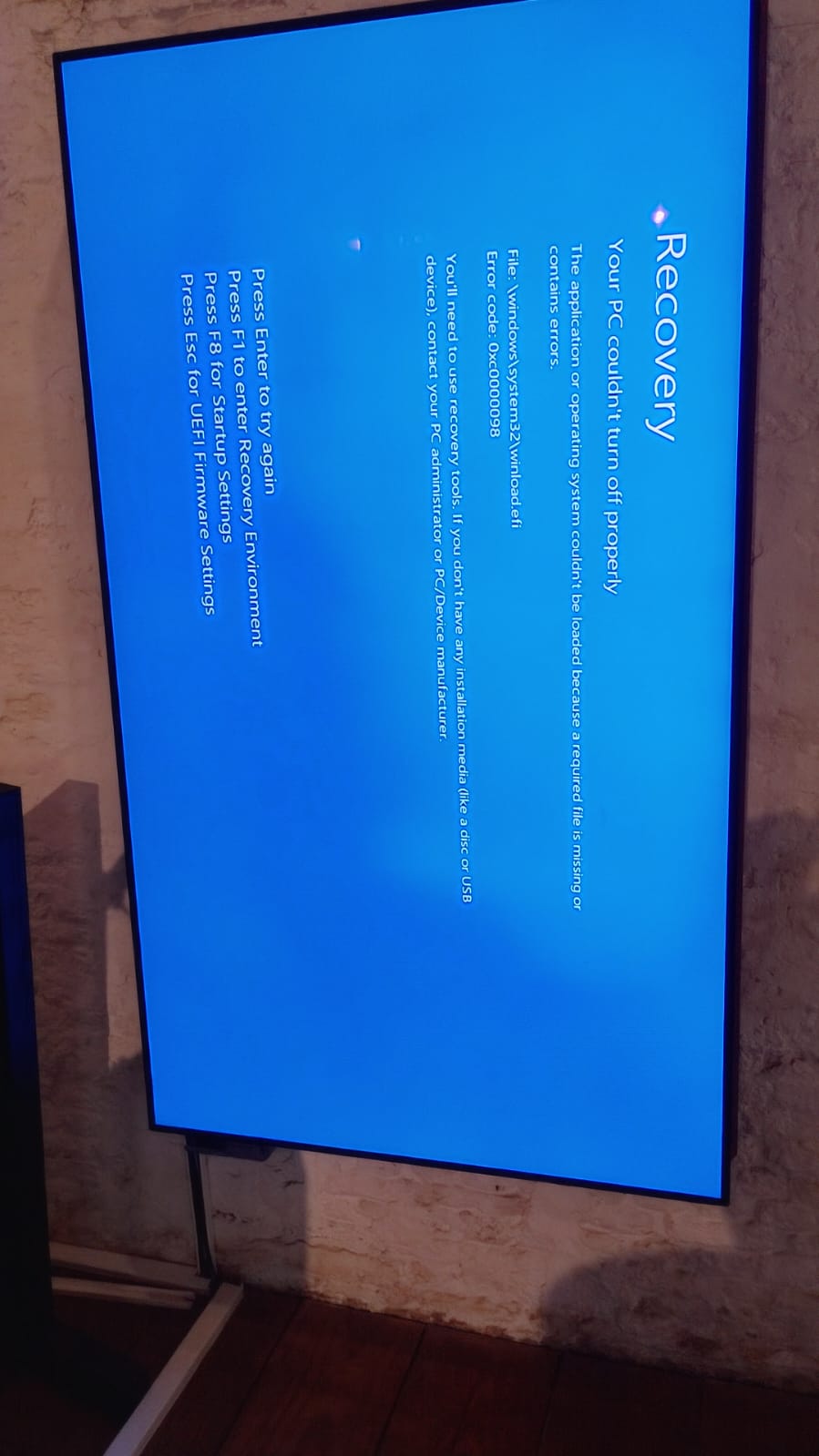
What the second photo shows
Windows Boot Manager recovery, not a BSOD:
Your PC couldn't turn off properly
The application or operating system couldn't be loaded because a required file is missing or contains errors.
File: \windows\system32\winload.efi
Error code: 0xc0000098
0xc0000098 means the BCD entry or a boot-critical file is damaged. At that moment the machine could not
boot Windows at all.
New crash data since the first pass
Two more bugchecks today, both 0x0000003B SYSTEM_SERVICE_EXCEPTION with 0xc0000005 (access violation):
14:18:02  0x3B (c0000005, fffff8009e3196c0, ffffb486c5eee5b0, 0)
14:53:26  0x3B (c0000005, fffff802ab3196c0, fffff58b0f7265b0, 0)
The module bases differ (kernel ASLR randomises them per boot) but the faulting instruction lands on the
same offset ...3196c0 both times. That is a deterministic fault in one specific kernel module, which
argues against random hardware degradation and for a corrupted or buggy driver.
Boot history today, 9 starts: 06:42:21, 13:25:14, 13:48:52, 13:52:16, 14:16:48, 14:18:03, 14:53:26,
15:31:32, 16:25:21.
The update churn is real
Matching "hij is al de hele tijd aan het updaten":
- KB5007651 (Windows Security platform) installed 13:50:55, i.e. between the second and third GPU crash.
- Defender security intelligence updates at 13:35:27 and 15:41:43.
A machine that bugchecks part-way through update servicing is a good way to end up with a damaged boot
loader, which is exactly the 0xc0000098 in the photo.
Still no CPU or memory-controller evidence
Zero WHEA-Logger events, all time. No machine-check exceptions, no corrected PCIe errors. A degrading
CPU or memory controller almost always leaves a WHEA trail well before it starts bugchecking. Nothing here.
Revised assessment
- CPU: ruled out for practical purposes. No WHEA, no evidence.
- GPU hardware: demoted to secondary. Still possible, but the repeatable 0x3B offset and the boot-file
corruption both point at software state rather than silicon. - Primary hypothesis: corrupted system and driver state on this Windows install, with a Windows Update
servicing loop grinding against it. The 39 video engine timeouts may be a symptom of a broken display
driver stack rather than a dying card.
On "Working as expected again"
This does not close the issue. The box has recovered and re-broken at least four times today, and it is
currently offline from hydracluster (last heartbeat lost around 16:31 local, still offline at 16:40)
even though the screen was reported working at 16:32. hydranode is not heartbeating after the 16:25 boot.
Revised next steps (physical access to wobbly required)
- Do not treat the current working state as a fix.
- Repair system state first, in this order, rebooting between:
chkdsk /f(the boot corruption),
sfc /scannow,DISM /Online /Cleanup-Image /RestoreHealth. - Let Windows Update drain to a clean state, then pause updates on this body machine. Body machines
auto-installing updates during show hours is an operational hazard that deserves its own issue. - Remove the duplicate VDD adapter instance (ROOT\DISPLAY\0001) so one virtual display remains.
- DDU clean reinstall of the NVIDIA driver.
- Only if the GPU engine timeouts survive steps 2 to 5: memtest plus a VRAM/compute stress pass, and then
treat the 5070 Ti as an RMA candidate. - Separately, find out why hydranode is not heartbeating after the last boot.
Location correction
Operator confirms the machine is physically at Rupelmonde. The hydracluster node record still says
venue nerdland, district bxl1-test. Worth correcting separately, since venue feeds body discovery.
Session Context
- Venue
- Rupelmonde
Attachments (2)

Comments (3)
Working as expected again
Status: parked, no intervention for now (decision 2026-08-02).
Full analysis is in the issue description, including the update written after the boot-recovery photo
and the "working as expected again" report. Short version:
- The dialog is a UE GPUCrash (D3D12 device removal), 13 crash dumps since March, 3 today, hitting
11 to 37 seconds after launch. - Not a Mercator bug: the Rupelmonde experience and Sunshine crash the same way on this machine.
- Machine-level instability: 39 x LiveKernelEvent 0x141 (video engine timeout), nvlddmkm Event 153 at
each crash, and 6 kernel bugchecks today and yesterday. - The two most recent bugchecks (0x3B, 14:18 and 14:53) fault at the same instruction offset ...3196c0
under different ASLR bases, which points at one specific kernel module rather than random hardware decay. - The second photo is Windows Boot Manager recovery (winload.efi, 0xc0000098), a damaged boot loader,
consistent with bugchecking part-way through Windows Update servicing. - Zero WHEA-Logger events all time, so no CPU or memory-controller evidence. GPU hardware is a secondary
hypothesis, not the leading one.
Current state at time of parking: the experience was reported working again at 16:32 local, but the node
is OFFLINE from hydracluster (heartbeat lost around 16:31, still offline). hydranode is not reporting
after the 16:25 boot.
No remote action is being taken. Nothing on this machine has been changed by this investigation: read-only
queries only, and two queued diagnostic commands were cancelled when the node went offline.
Deliberately NOT done, awaiting a decision:
- No chkdsk / sfc / DISM repair.
- No VDD duplicate-adapter cleanup (ROOT\DISPLAY\0001 still present).
- No NVIDIA driver reinstall or rollback.
- No Windows Update pause on the body machine.
- No change to the hydracluster node record, which still reads venue
nerdland/ districtbxl1-test
while the machine is physically at Rupelmonde.
Leaving this open rather than closing on "works again": the box has recovered and re-broken at least four
times today, so the current working state is not evidence of a fix. Repair sequence, when someone does pick
it up, is in the description under "Revised next steps".
Hij is al de hele tijd aan het updaten en vanzelf opnieuw opstarten, nu komt dit op het scherm